
Audio context engineering for speech recognition

At Weekend, every game we build is voice-driven. This means speech-to-text (STT) transcription accuracy isn’t just a backend metric, but directly impacts the core player experience in our games.
The failure mode is painfully obvious: a player confidently shouts the correct answer in a trivia game… and the game marks it wrong because it was incorrectly transcribed. In fast-paced, social games such as Song Quiz and Wheel of Fortune, even small transcription errors break immersion and frustrate users.
What makes this especially challenging is the nature of player input. Unlike typical speech applications—meetings, dictation, or narration—our utterances are extremely short and context-poor: a song title (“One Time”), an artist (“Justin Bieber”), or even a single letter (“E” or “I”).
Take “I” for example: it could be the letter, the word “eye,” or *“*Aye”, a pirate’s favorite affirmative. Acoustics alone isn’t enough for accurate transcription, the interpretation depends heavily on the context. Players assume that context is obvious and keep input brief, but the model doesn’t share that implicit scene understanding by default. Recovering enough context for accurate transcription therefore requires deliberate engineering so even short, low-context user inputs can be transcribed accurately.
In early experiments with speech recognition in Song Quiz (our name-that-tune game), we noticed a surprising pattern:
“One Time Justin Bieber” was more likely to be transcribed accurately than “Justin Bieber One Time.”
The latter was sometimes transcribed into “Casting paper One Time”.
This suggested a hypothesis: Speech recognition models are more error-prone when ambiguous tokens appear first without sufficient context, causing decoding to drift toward more probable alternatives.
If that’s true, could we artificially inject context to improve recognition?
This question led us to explore a technique we call audio context engineering: Injecting short audio cues before user speech to bias transcription. We found this reduced error rates by 10%-20%.
How context fits into modern ASR systems
Modern ASR systems are very strong on average speech, but still struggle with rare or ambiguous input, especially when context is limited. The standard ways to fix this are keyword biasing (nudging the decoder toward expected words) or text prompting (conditioning the model after audio encoding). Both approaches act later in the pipeline: they influence decoding, but do not directly influence how audio itself is encoded.
A useful way to think about this is that most systems are prompt-blind at the encoder level. The audio encoder processes speech without knowing the task, and only later does the model see hints about what it should be listening for. By this time, the encoder may already have committed to a more frequent interpretation.
Audio prefixing takes a different approach. Instead of injecting context at decoding time, it feeds context through the same pathway as speech. That means the model is “primed” before it starts interpreting the user’s audio. In the rest of this post, we examine how this simple update performs in practice.
Testing the hypothesis
Concretely, before transcribing, we prepend inject a short contextual TTS audio clip before each player utterance (invisible to the player). For example:
- In Song Quiz: “transcribe a song name and artist name: [player guess]”
- In Wheel of Fortune: “I’m trying to guess a letter: [player guess]”
Where audio context engineering helps the most
We see the biggest gain from context injection on commercial streaming models, reducing overall error rates by 10-20% (82% improve vs. 18% regress). The effect is the strongest when testing streaming models in Wheel of Fortune, our game where player inputs are often just a single letter, compared to Song Quiz where longer phrases provide more inherent signal.
On the other hand, distilled and smaller models (e.g. Whisper/distil-small.en) show the least gains from context engineering, and oftentimes regress (See Figure 1 for details).
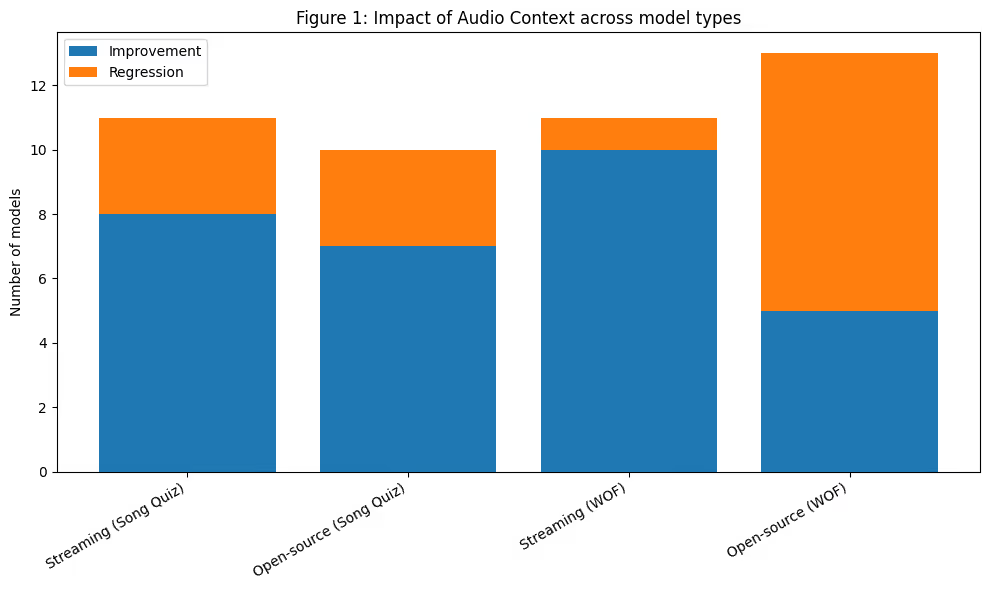
In Song Quiz, where players guess song titles and artist names, without keyword or phrase biasing layered on top we ran paired before/after tests on joint title-and-artist accuracy:
- Streaming commercial models (N=11): 8 improve (up to +12.1%)/ 3 regress; among 6 providers.
- Open-source local models (N=10, text-prompt analog): 7 improve (up to +1.6%) / 3 regress (down to −1.9%); among 6 model families.
In Wheel of Fortune, where players guess single letters:
- Streaming commercial APIs (N=11): 10 improve (up to +22.3%) / 1 regress (−8.6%); among 7 providers.
- Open-source local models (N=13, text-prompt analog): 5 improve (up to +42%) / 8 regress (down to −72%); among 6 model families.
Distilled and smaller Whisper checkpoints gain less, and often regress. Within the Whisper family, prefix benefit scales with model size: full Whisper-large-v3 stays near neutral on both games, distil-large-v3.5 lifts slightly (+0.8% on Song Quiz), but distil-small.en drops 34% on Song Quiz and whisper-tiny loses 72% on Wheel of Fortune. We hypothesize that this is due to prefix conditioning the decoder via encoder embeddings, shifting early token probabilities. Larger models can better preserve alignment to the input audio under this shift, while in smaller models, prefixes may interfere with decoding more than guiding it.
The “right” context matters
We observed that adding audio alone isn’t enough, only task-relevant context improves recognition. Irrelevant cues and even silence can hurt, while small timing details like a short gap materially affect performance (See table 1 for details).
Table 1: Impact of Audio Context Type on Speech Recognition Accuracy
To rule out that gains come simply from feeding the model more audio, we swapped the in-domain game audio cue for an unrelated, length-matched clip, such as “I am going to give an announcement”. That control did not lift accuracy and on one provider it slightly hurt, so the win is from the actual audio context, not random tokens that extend length.
The effect of pure silence before the user spoke was mixed: on one provider it degraded accuracy and roughly doubled invalid transcripts. We suspect this is the prefix interacting with the endpointing/VAD layer that commercial ASR stacks ship alongside the recognizer, rather than the recognizer itself.
One detail does matter: a small silence gap (0.5s) between the audio context and the user’s utterance consistently outperforms the gap-less version. The separation keeps the audio context from bleeding into the first decoded word.
Audio context, keyword biasing and prompting
In ASR, three mechanisms provide context, but operate at different points in the model stack. We’ll use the utterance “Justin Bieber One Time” to illustrate how each method incorporates context:
- Keyword / phrase biasing. A list of expected words is passed alongside the audio, and the decoder reweighs those candidates during beam search. The acoustic model is unchanged, but only token probabilities are adjusted. This acts on the decoder layer. Example bias list: [“Justin Bieber”, “One Time”].
- Text prompting. A short instruction conditions the decoder before transcription (Whisper’s
initial_prompt; LLM-ASR systems like Gemini or Mistral Voxtral). This acts on the language-model layer. Example prompt: ‘Transcribe a song title and artist, which may include terms in this list: Justin Bieber”. - Audio prefix. A short spoken cue is prepended to the user’s audio, and then removed downstream downstream. This acts at both the acoustic and language-model layers, where the encoder hears the task framing and conditions everything that follows. This acts on the language-model layer. Example prefix: “Transcribe a song name and artist name:”.
Provider support and cost
In practice, almost no model supports both keyword and prompting. Across 22 STT models we evaluated:
- 12 support keyword / phrase biasing
- 7 support text prompting
- 3 support neither
Interestingly, the three models with neither features were among the most recently released (2025–2026). While this is a small sample, it suggests that biasing and prompting may be treated as secondary features by providers, added after the core model is shipped rather than designed in from the start.
In contrast, audio prefixing works with any audio model, since it operates directly on the input. One tradeoff is cost—adding audio context increases latency and compute linearly with the duration of the prefix.
Where audio prefixing has an engineering edge: variable context
Keyword lists and text prompts work best when the vocabulary is stable (e.g. kiosk ordering or form filling). In our voice-driven trivia games at Weekend, the target distribution changes every game round, so keyword lists must be rebuilt per turn and may still miss long-tail plausible answers. Audio prefixing, by contrast, can be a singular short audio clip that is easy to swap in, eval, and ship across all rounds.
Audio context first, keyword/prompting as a second layer
In practice, we find it effective to start with audio context engineering first to improve accuracy: it captures most of the gain on STT streaming providers. Keyword biasing, or text prompting with keywords can then be layered when evaluations show additional accuracy headroom. For providers that don’t expose keyword biasing, audio context engineering is the only available option. The breakdown below (Table 3) compares prefix and keyword/prompting performance without stacking them:
Table 3: Performance of audio prefix vs keyword/prompting w/o stacking
To investigate the stacking effect, we further conducted four-way comparisons: baseline, keyword/prompting, prefix, stacking of both prefix and keyword/prompting. Across the 22 four-way comparisons we ran on Wheel of Fortune, 3 favored using both layers. In the remaining case, prefixing is more likely to dominate over keyword/prompting (see Table 4 for details).
Table 4: Stacking effect of prefix + keyword/prompting
Conclusion
Context engineering is already widely recognized as a powerful lever in AI systems, but it’s largely missing as a tool from today’s speech recognition systems.
Our experiments showed that it matters: a short, task-relevant audio cue lifts joint accuracy on most streaming commercial models (10 of 11 models on our Wheel of Fortune test, and 8 of 11 on Song Quiz) without any keyword biasing or prompting. ****In effect, this acts as a substitute for those mechanisms when they aren’t exposed. ****That said, this gain does not apply equally to distilled and smaller models.
The deeper issue is architectural. Most SOTA ASR systems today use prompt-blind audio encoders: the encoder commits to a fixed representation of the audio, and context only enters later at the decoder. By then, it may already be too late. If the encoder has collapsed “i” into “eye,” downstream decoders or a separate LLM layer need to work harder to recover the distinction, as the relevant acoustic information is already lost.
This is precisely why context engineering moved the needle so much in our experiments: by prepending audio context to the input, we steer the encoder itself toward the right interpretation, rather than trying to repair its output downstream. But this is an indirect lever: we're smuggling intent into the encoder through the only channel it listens to (audio), when what we actually want is to tell it directly.
In the long term, we see a strong case for prompt- and context-aware audio encoders: systems that natively incorporate prior signals like game state, expected answer types, or conversational history into feature extraction itself, rather than encoding that intent as audio just so the encoder will hear it.
Mingyuan Zhong is a Staff Software Engineer at Weekend, uplifting speech recognition foundation across our TV games. Sishi Tang is the Engineering Manager leading the AI team at Weekend.
The results above were generated using a mix of commercial speech-to-text providers and open-source model families with our internal Song quiz (3,000 labels) and Wheel of Fortune datasets (2,000 labels). This post is not intended as a benchmark or ranking among commercial providers — coverage, model versions, and configurations differ across vendors, and our focus is the impact of audio context adaptation, not vendor comparison.
Listed alphabetically:
- Commercial providers: Alibaba Cloud, AssemblyAI, Deepgram, ElevenLabs, Fireworks, Google, Inworld
- Open-source model families: FireRed-AED, IBM Granite, Kyutai, Moonshine, NVIDIA NeMo (Parakeet / Canary), OpenAI Whisper (incl. HuggingFace’s Distil-Whisper), Qwen3-ASR, Voxtral.

















%20(1).png)
.png)
.png)

Free for 7 days. Cancel anytime.


